-
-
In this experimental study we try to compare the most popular Big Data frameworks. We divided the experiment study into two parts: (1) batch mode processing and (2) stream mode processing.The experimental study covers the performance, scalability, and resource usage study of frameworks such as SPARK, HADOOP, FLINK and STORM. We have chosen the WordCount example as a use case study to evaluate the frameworks in batch mode and an Extract, Transform, Load (ETL) process to evaluate the studied frameworks in stream mode.
All the experiments were performed in a cluster of 10 machines, each equipped with Quad-Core CPU, 8GB of main memory and 500 GB of local storage. For our tests, we used HADOOP 2.6.3, FLINK 0.10.3, SPARK 1.6.0 and STORM 0.9. For all the tested frameworks, we used the default values of their corresponding parameters.




We consider two scenarios according to the data processing mode. For each scenario, we measure the performance of the presented frameworks.
- Batch Mode: In the Batch Mode scenario, we evaluate HADOOP, SPARK and FLINK while running the WordCount example on big set of tweets. The used tweets were collected by Apache Flume and stored in HDFS. The motivations behind using Apache Flume to collect the processed tweets is its integration facility in the HADOOP ecosystem (especially the HDFS system). Moreover, Apache Flume allows collecting data in a distributed way and offers high data availability and fault tolerance. We collected 10 billions tweets and we used them to form large tweet files with a size on disk varying from 250 MB to 40 GB of data.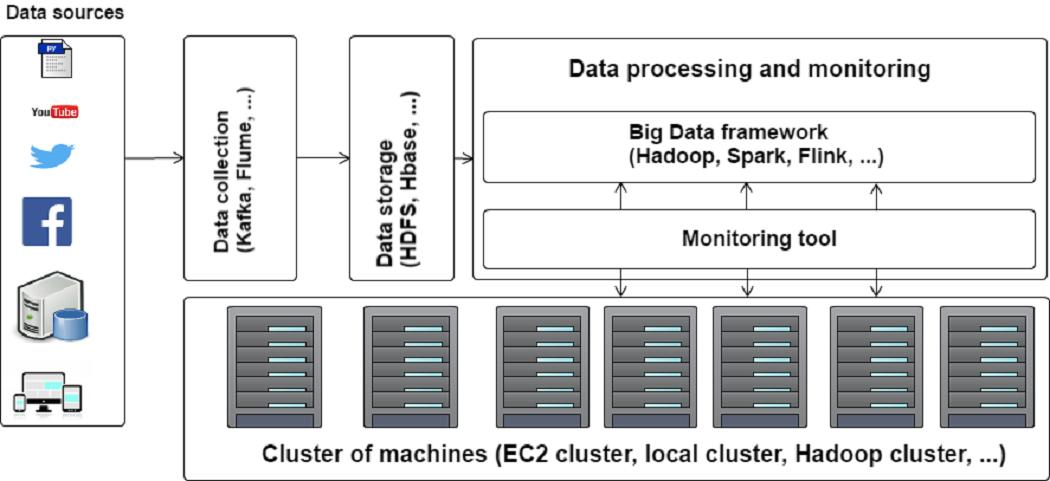
Fig 1. Batch Mode scenario
- Stream Mode: In the Stream Mode scenario, we evaluate real-time data processing capabilities of STORM, FLINK and SPARK. The Stream Mode scenario is divided into three main steps. The first step is devoted to data storage. Do to this step, we collected 1 billion tweets from Twitter using Apache Flume and stored in HDFS. Those data are then sent to KAFKA, a messaging server that guarantees fault tolerance during the streaming and message persistence .
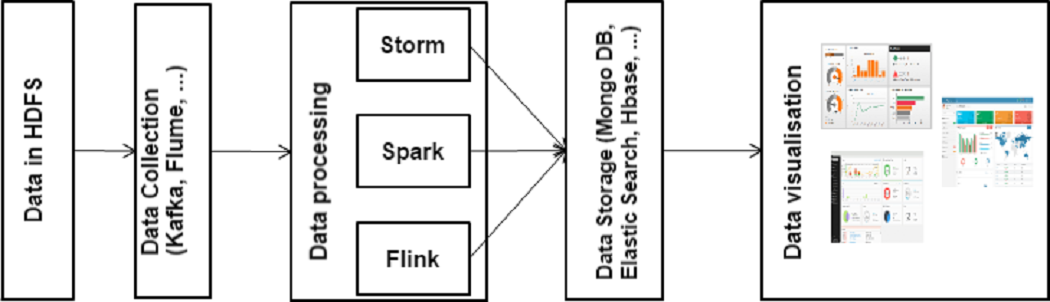
Fig 2. Stream Mode scenario
To allow monitoring resources usage according to the executed jobs, we have implemented a personalized monitoring tool as shown in the Figure below.
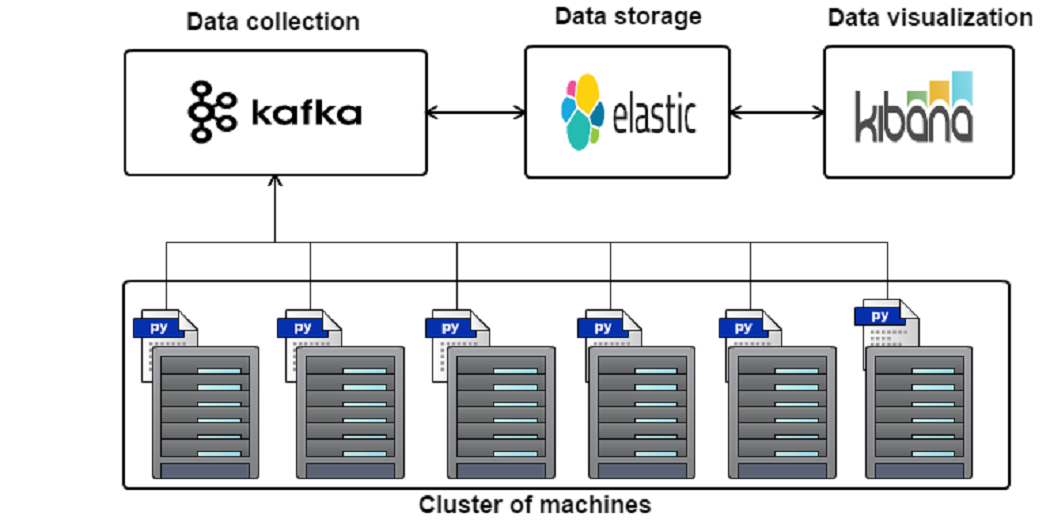
Fig 3. Architecture of our personalized monitoring tool
- Batch Mode: Scalability
-
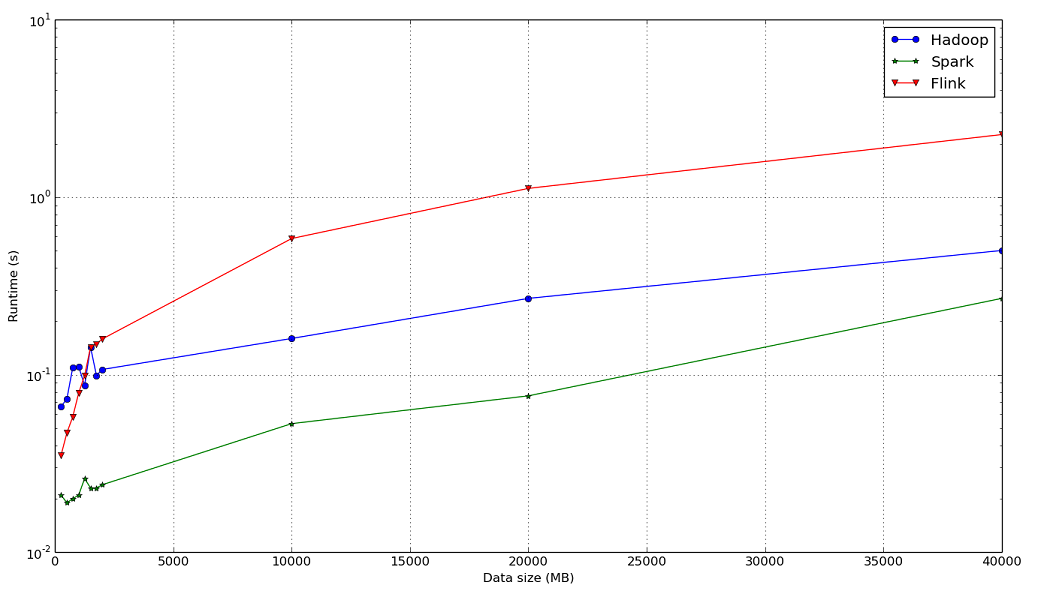
Fig 4. Impact of the data size on the average processing time.
-
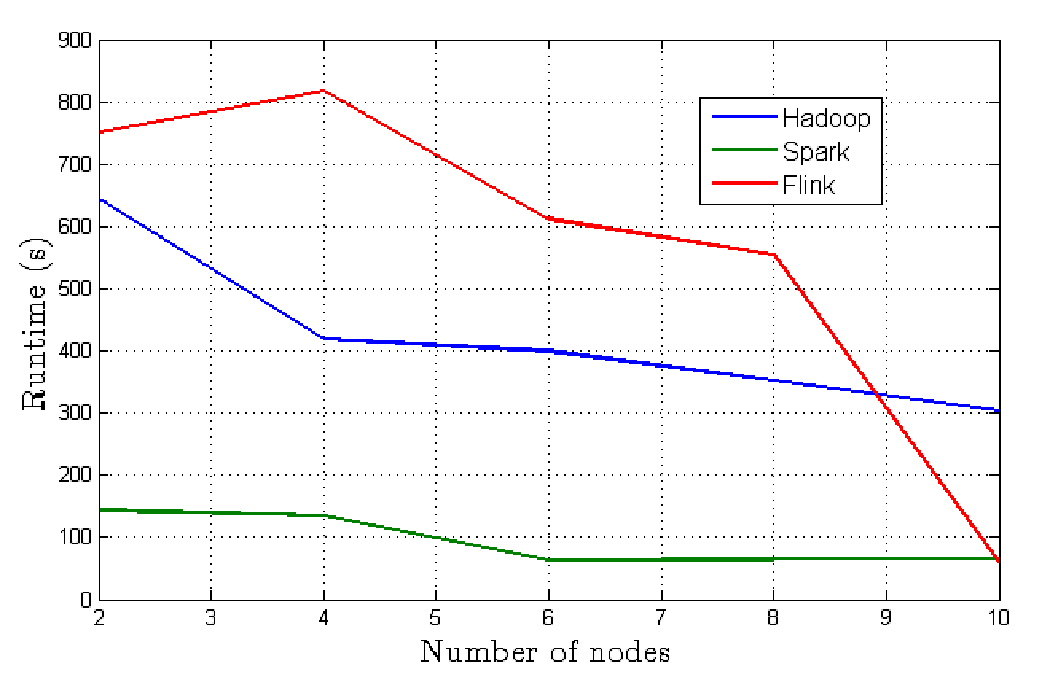
Fig 5. Impact of the number of machines on the average processing time.
- Batch Mode: Resource usage
-
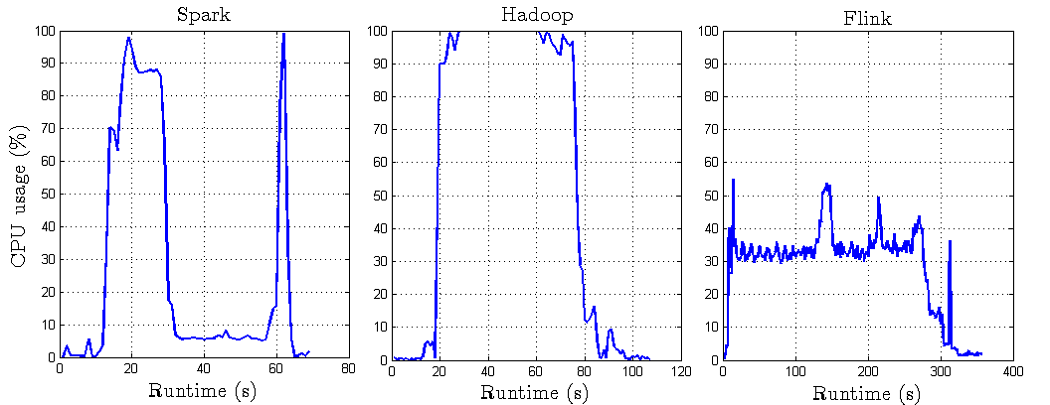
Fig 6. CPU resource usage in Batch Mode.
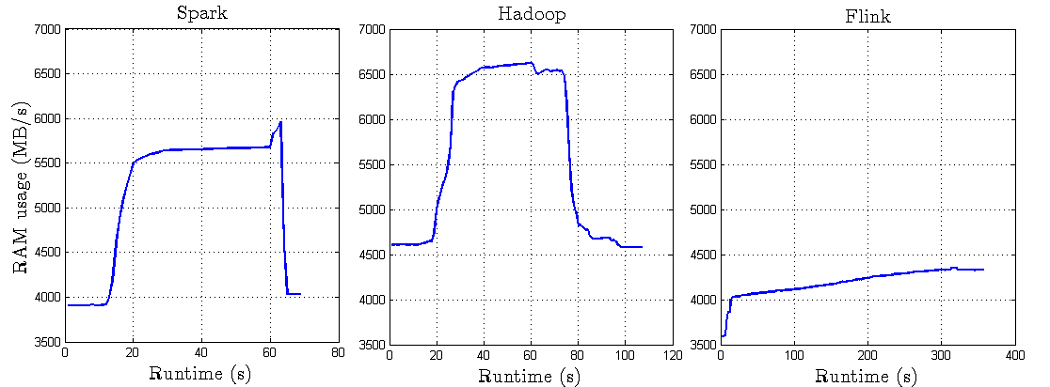
Fig 7. RAM resource usage in Batch Mode.
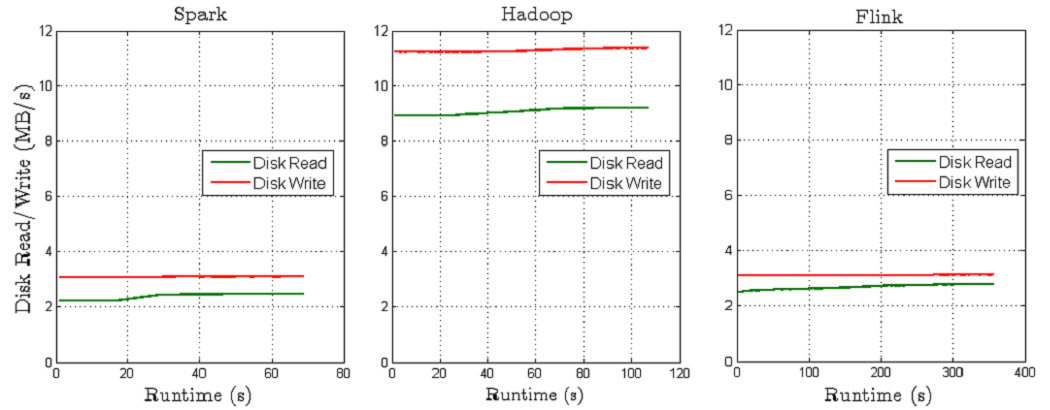
Fig 8. Disk resource usage in Batch Mode.
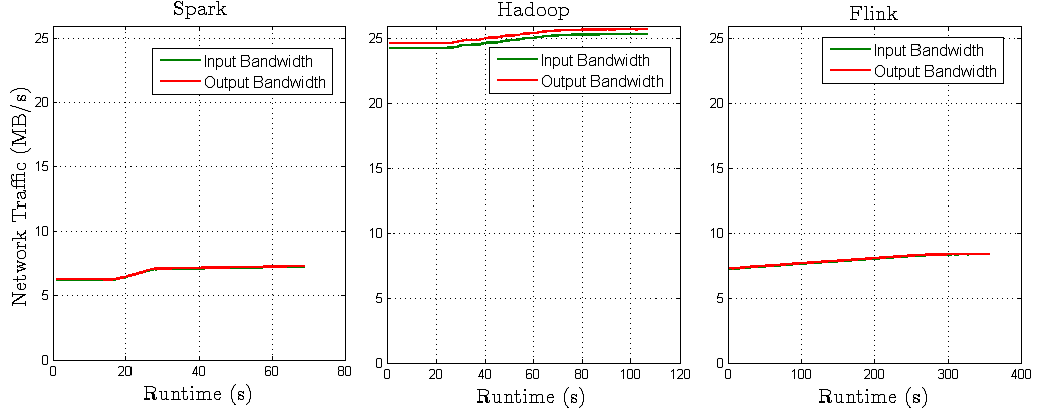
Fig 9. BW resource usage in Batch Mode.
- Stream Mode: Events processing
-
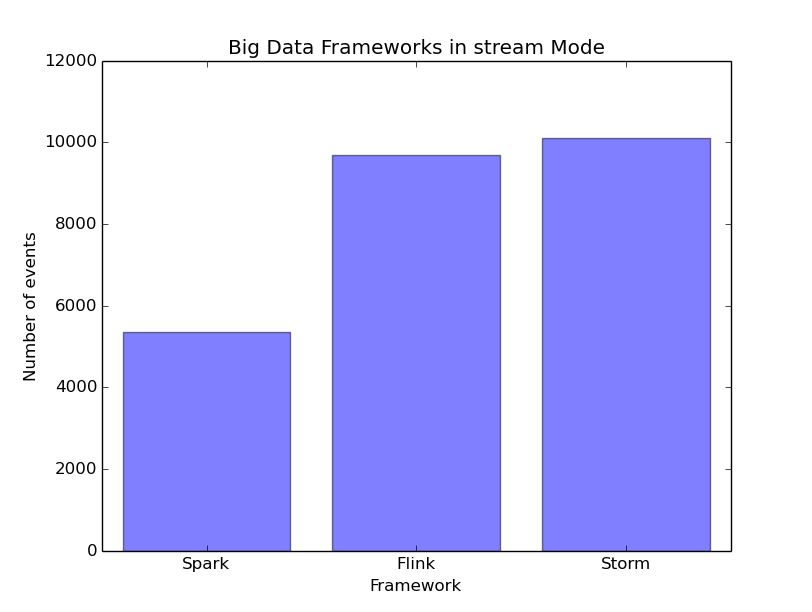
Fig 10. Number of processed events.
- Stream Mode: Resource usage
-
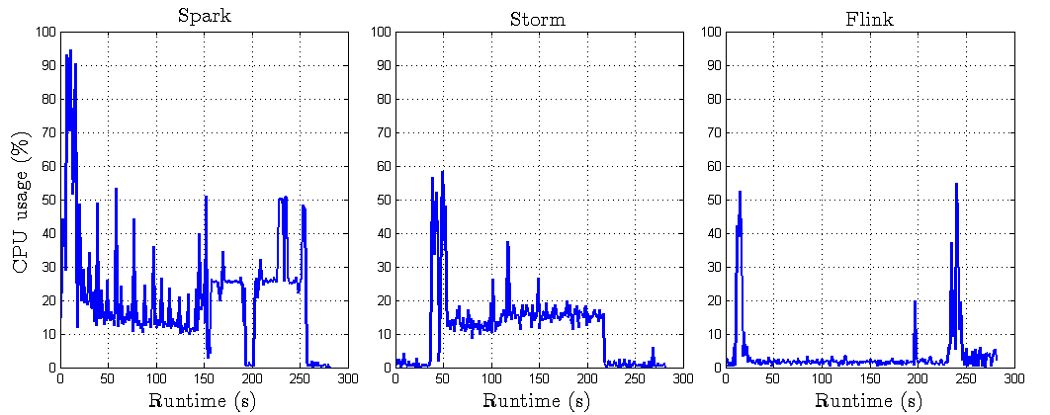
Fig 11. CPU resource usage in Stream Mode.
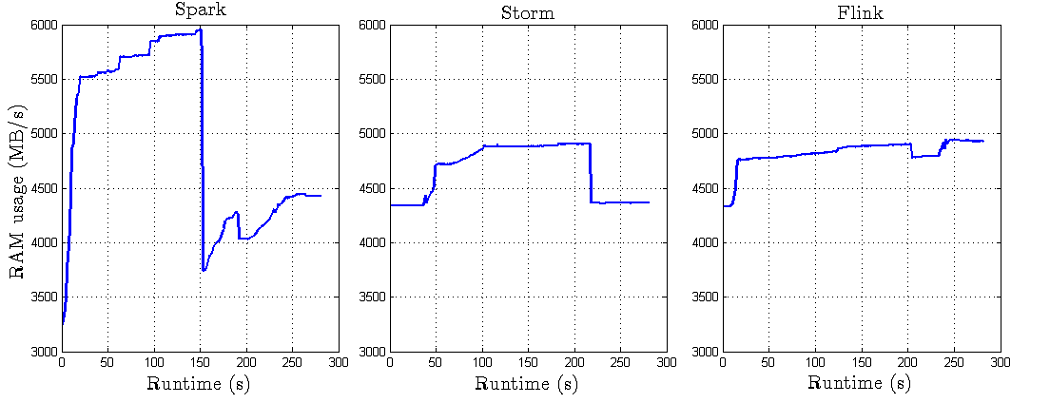
Fig 12. RAM resource usage in Stream Mode.
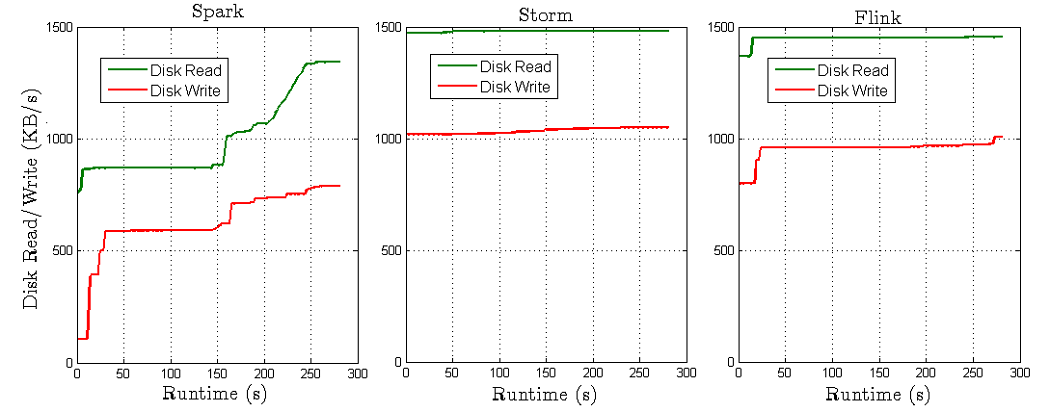
Fig 13. Disk resource usage in Stream Mode.
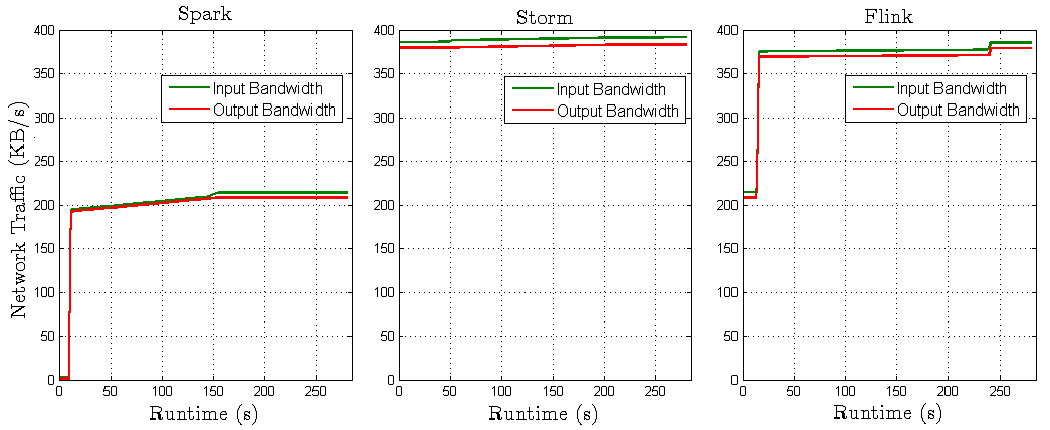
Fig 14. BW resource usage in Stream Mode.
- Batch Mode scenario
-
Flink project (Jar file and source code) is downloadable here.
To run a Flink project, please follow the following steps:
1- start your Flink cluster (using this command: /home/hduser/flink/bin/start-cluster.sh)
2- submit your jar file (/home/hduser/flink/bin/flink run -c [com.flink.App] [flink-bach-1.0-SNAPSHOT.jar] [data in hdfs] [size of data] [number of nodes in cluster]) -
Hadoop project (Jar file and source code) is downloadable here.
To run the Hadoop project, please follow the following steps:
1- start your Hadoop cluster (using this command: /home/hduser/hadoop/sbin/start-all.sh)
2- submit your jar file (hadoop jar [wordcounth-1.0-SNAPSHOT.jar] [com.hadoop.App] [input HDFS] [output HDFS] [size of data] [number of nodes in cluster]) ) -
Spark project (Jar file and source code) is downloadable here.
To run a Spark project, please follow the following steps:
1- start your Spark cluster (using command: /home/hduser/spark/sbin/start-all.sh)
2- submit your jar file (/home/hduser/spark/spark-submit --class [com.spark.App] [--master spark://master:7077] [sparkbatch-1.0-SNAPSHOT.jar] [input HDFS] [output HDFS] [size of data] [number of nodes in cluster]) - Stream Mode scenario
-
Flink project (Jar file and source-code) is downloadable here.
To run a Flink project, please follow the following steps:
1- start your Flink cluster (using this command: /home/hduser/flink/bin/start-cluster.sh)
2- submit your jar file ( /home/hduser/flink/bin/flink run -c [com.flink.App] [flink-bach-1.0-SNAPSHOT.jar] [zookeper nodes ] [Kafka topic] ) -
Storm project (Jar file and source-code) are downloadable here.
To run a Storm project, please follow the following steps:
1- start the nimbus deamon (using this command: /home/hduser/storm/bin/storm nimbus)
2- start a supervisor deamon in all slave nodes (using this command: /home/hduser/storm/bin/storm supervisor)
3- submit your jar file (home/hduser/storm/bin/storm jar [storm-1.0-SNAPSHOT-jar-with-dependencies.jar] [com.storm.Topologie] [zookeeper node] [Kafka topic] ) -
Spark project (Jar file and source code) is downloadable here.
To run a Spark project, please follow the following steps:
1- start your Spark cluster (using this command: /home/hduser/spark/sbin/start-all.sh)
2- submit your jar file (/home/hduser/spark/spark-submit --class [com.spark.App] [--master spark://master:7077] [sparkbatch-1.0-SNAPSHOT.jar] [zookeeper node] [kafka topics] ) - Monitoring tool:
- Please find our python script (deployed in every machine of our cluster to collect CPU, RAM, Disk I/O, and Bandwidth history) in the github repository.
- Queries:
- For any query related to the used datasets and the source files, please send your request to sabeur [dot] aridhi [at] loria [dot] fr.
-